Fleet Compliance at Scale: Embedding GitHub Copilot SDK as an Autonomous Agent Brain
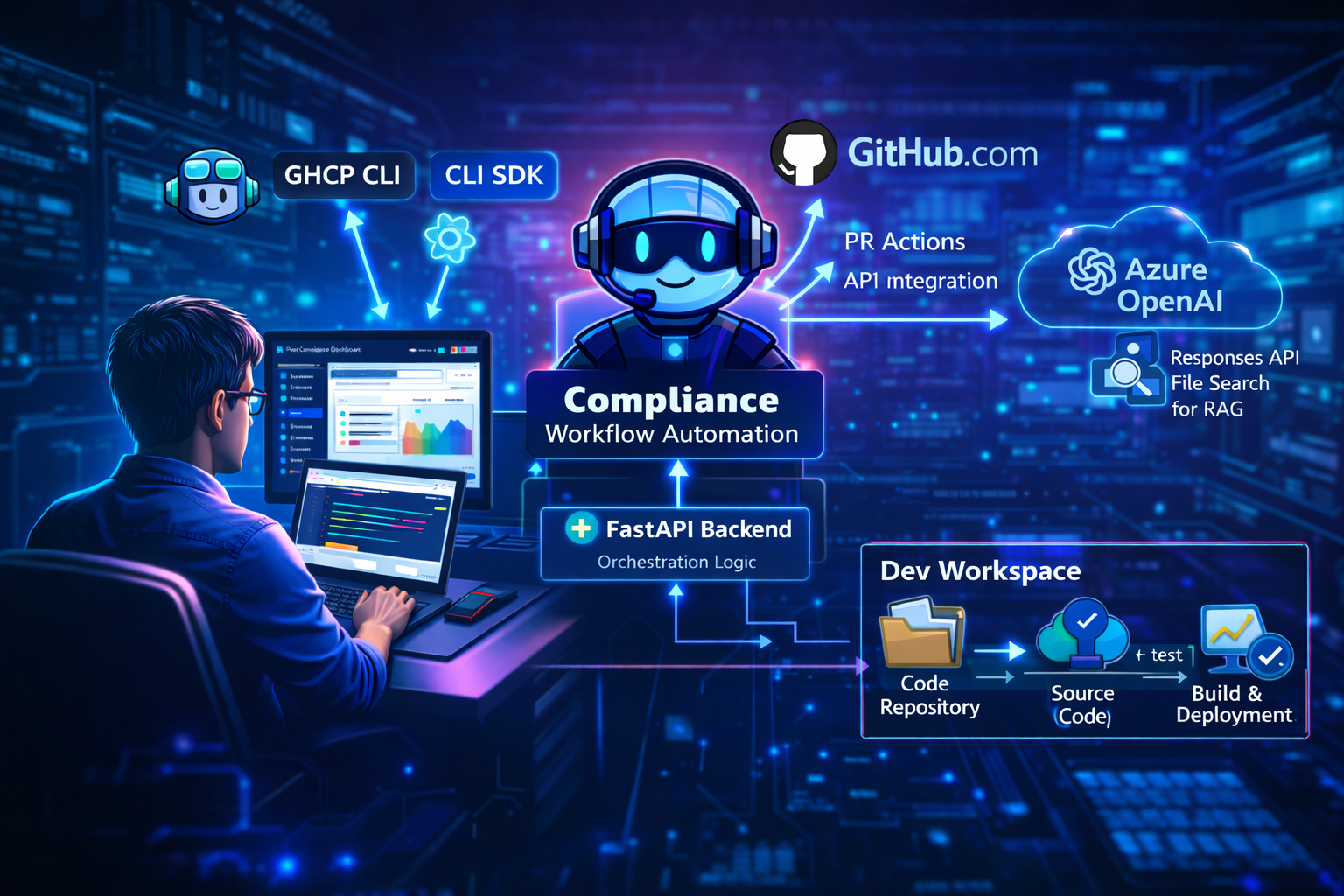
Introduction: From Interactive Assistant to Peer Programmer to Enterprise Orchestrator
GitHub Copilot has evolved rapidly. Developers know it as an interactive coding companion in the IDE — you type a question, it responds. Then came the CLI and Agent Mode for multi-step tasks. More recently, GitHub’s coding agent on GitHub.com can be assigned an Issue or asked to review a Pull Request just like a team member — a genuine peer programmer operating within the development platform.
But all of these operate primarily within the GitHub ecosystem and, for the most part, with a human guiding the conversation. What happens when the workflow needs to reach beyond GitHub — into organizational knowledge bases, change management systems, security scanners, and other enterprise backends?
That’s where the GitHub Copilot SDK opens a fundamentally different door. It lets you embed Copilot’s AI reasoning into your own agents — agents that don’t just work with code and repositories, but orchestrate across enterprise systems through RAG and MCP Servers, making context-aware decisions grounded in organizational policy.
The Fleet Compliance Agent demonstrates exactly this pattern. It’s a Python-based compliance agent that uses the GitHub Copilot SDK to automatically enforce organizational policies across a fleet of microservices — retrieving policies from a knowledge base, calling external services for security scanning and change management, applying patches, running tests, and creating evidence-backed Pull Requests — all autonomously.
The Key Insight: The peer programmer model on GitHub.com is compelling for tasks that live naturally within GitHub. But when the workflow requires pulling context from knowledge bases (RAG), calling specialized backend services (MCP Servers), and routing decisions based on business criticality — you need to embed the Copilot SDK into a custom agent that bridges these worlds. Code drives the conversation — sending structured prompts, registering custom tools, and letting the SDK autonomously decide the execution path across systems that span far beyond GitHub.
🎥 Video Demo
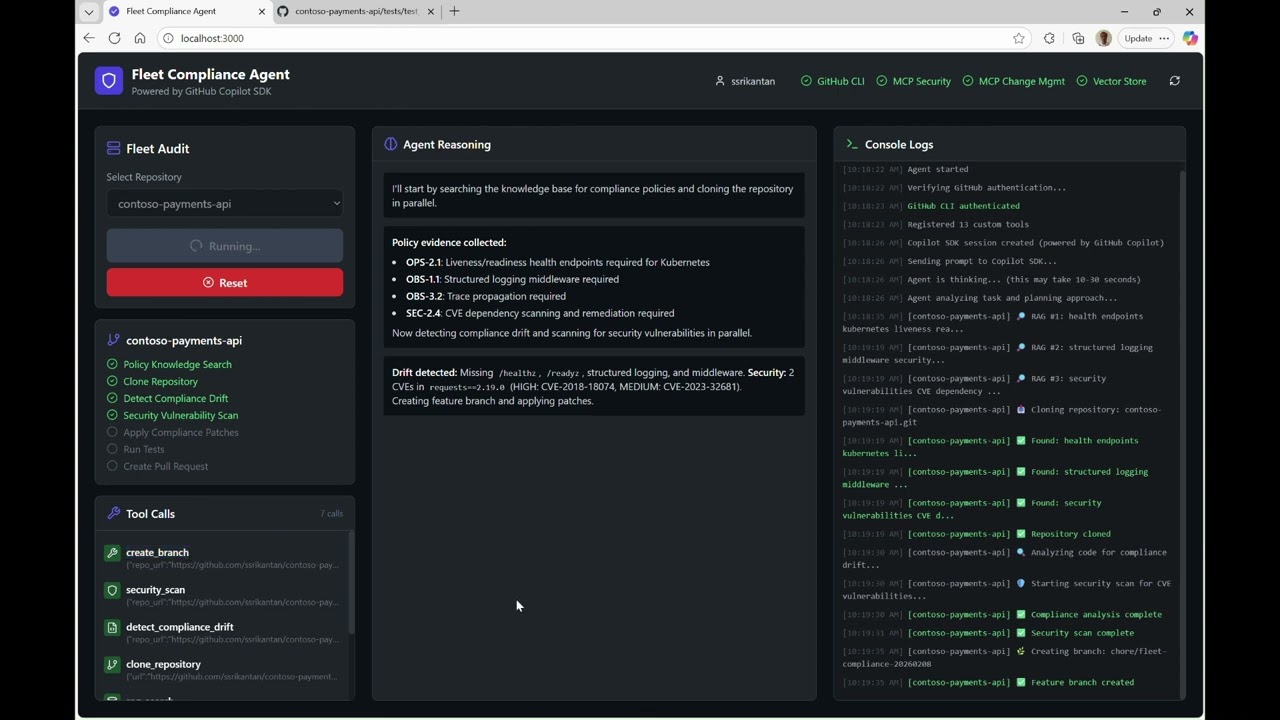
Click the image above to watch the Fleet Compliance Agent in action
Why GitHub Copilot SDK?
So how does the SDK actually make this possible? By exposing the Copilot CLI through a Python SDK, it gives you a programmable agent brain — the same reasoning capability, but invoked by code rather than a person. You register custom tools, send a natural-language prompt, and the SDK autonomously decides the execution path. The key difference: those custom tools can reach into any backend your organization runs in production — knowledge bases, change management platforms, security scanners, service registries — not just code and repositories.
How It Works
The Python SDK spawns the Copilot CLI in server mode and communicates via JSON-RPC. Your code registers tools, sends prompts, and receives events — while the CLI handles authentication, model communication, and token management.
Your Application
       ↓
   SDK Client
       ↓ JSON-RPC
Copilot CLI (server mode)
       ↓
  GitHub Copilot API
# The SDK starts the CLI in server mode and manages the session
client = CopilotClient()
await client.start()  # Spawns copilot CLI as background process

session = await client.create_session({
    "system_message": {"content": SYSTEM_PROMPT},
    "tools": [clone_tool, detect_drift_tool, apply_patches_tool, ...],
})
await session.send({"prompt": "Enforce compliance on contoso-payments-api"})
# SDK autonomously calls tools, reasons over results, and completes the workflow
The Agent Spectrum: Developers use GitHub Copilot interactively in the IDE and CLI. On GitHub.com, the coding agent acts as a peer programmer — assigned Issues, reviewing PRs — operating within the platform. In this sample, we take a further step: we embed the GitHub Copilot SDK directly into an autonomous agent whose reach extends beyond GitHub into enterprise backends via RAG and MCP Servers. The SDK becomes the reasoning engine for a workflow that orchestrates across organizational knowledge bases, change management systems, security scanners, and code repositories — a scope that goes well beyond what interactive or platform-native agents can address.
Preview SDK Notice: The GitHub Copilot SDK is currently in preview. This demo uses version
github-copilot-sdk>=0.1.21.
What This Demo Implements
The demo implements automated fleet-wide compliance enforcement — an AI agent that audits multiple microservices, detects policy violations, applies fixes, and creates Pull Requests with evidence.
Production vs. Demo Mode: In a production scenario, this agent would run headlessly — processing repositories one after another without any user interface, triggered by a schedule or event. This sample includes a React-based GUI to help visualize how embedding the GitHub Copilot SDK as an autonomous agent works. Note that human-in-the-loop is still required when reviewing and approving the Pull Requests — the automation proposes, humans approve.
SDK & AI Capabilities
| Capability | How It’s Used | Implementation |
|---|---|---|
| SDK as Orchestrating Agent | Copilot SDK is the “brain” that drives the entire compliance workflow end-to-end | SDK receives a single prompt, then autonomously executes all steps |
| Autonomous Tool Calling | SDK decides which tools to invoke based on the task | 13 custom tools registered with the SDK |
| Function Calling | Tools return structured JSON that the SDK reasons over | Each tool returns ToolResult with JSON payload |
| MCP Server Integration | External services for approvals and security scans | Change Mgmt (port 4101), Security (port 4102) |
| RAG (Retrieval-Augmented Generation) | Policy evidence grounded in organizational knowledge | Azure AI Search Knowledge Base (FoundryIQ) with extractive retrieval |
| Multi-Step Reasoning | SDK chains tools: clone → analyze → patch → test → PR | Event-driven workflow with state tracking |
| Real-Time Event Streaming | Live UI updates as agent executes | WebSocket events via asyncio.run_coroutine_threadsafe |
Compliance Features Demonstrated
| Feature | Description | Policy Reference |
|---|---|---|
| Fleet-Wide Enforcement | Automate compliance across multiple repos | - |
| Health Endpoint Detection | Identify missing /healthz and /readyz endpoints |
OPS-2.1 |
| Structured Logging | Detect and add structlog configuration | OBS-1.1 |
| Trace Propagation | Add middleware for W3C traceparent correlation | OBS-3.2 |
| Security Vulnerability Scanning | Scan dependencies for CVEs via MCP server | SEC-2.4 |
| Risk-Aware Approvals | Route PRs to appropriate approvers based on service tier | CM-7 |
| Evidence-Backed PRs | Include policy citations in PR descriptions | REL-1.0 |
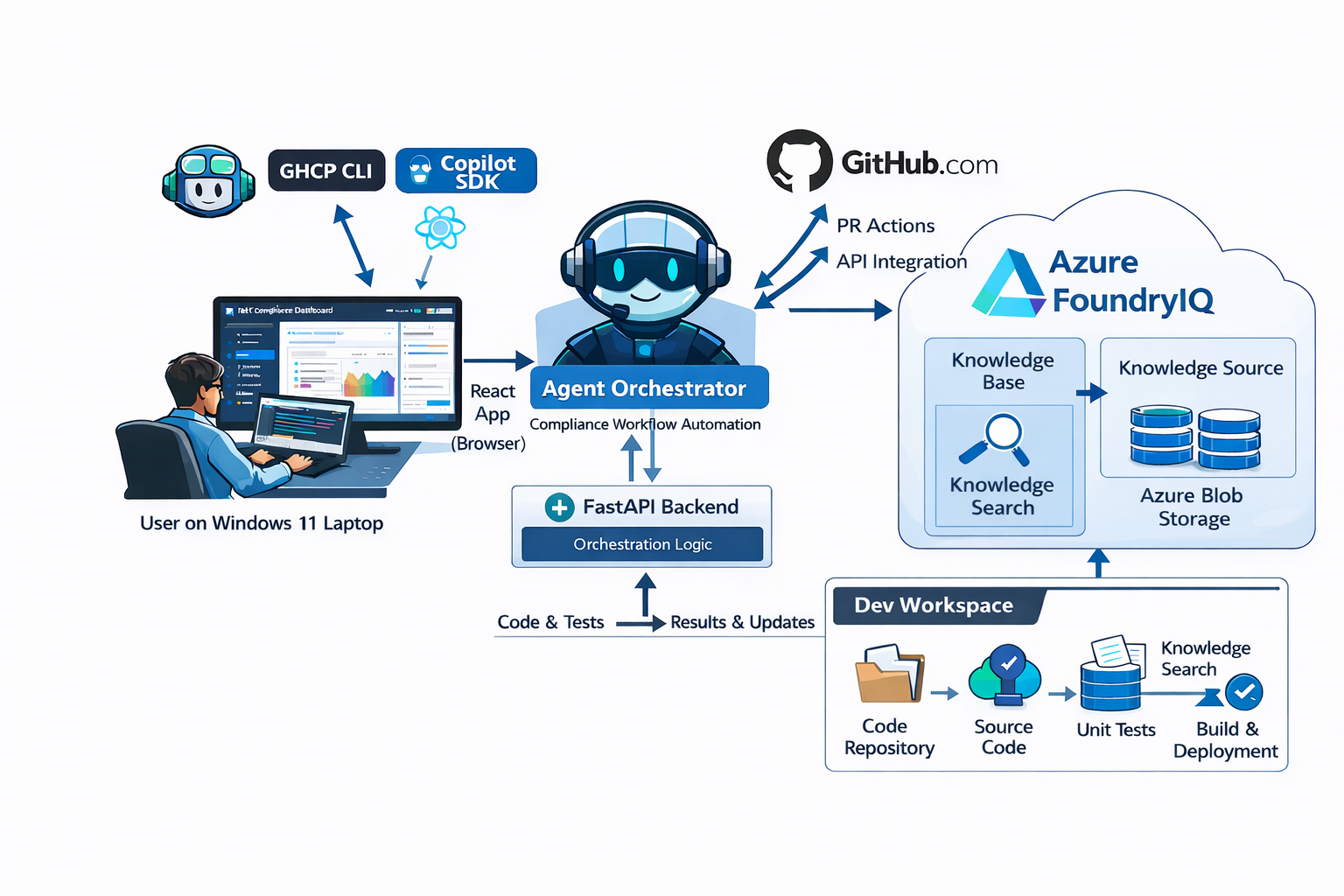
Architecture
The solution follows a layered architecture with the Copilot SDK at its core, surrounded by custom tools, MCP servers, and a real-time UI layer.
┌──────────────────────────────────────────────────────────────────────────────┐
│                         FLEET COMPLIANCE AGENT                               │
├──────────────────────────────────────────────────────────────────────────────┤
│  ┌──────────────────────────────────────────────────────────────────────┐    │
│  │              🖥️ Visual UI (React + FastAPI)                          │    │
│  │  ┌─────────────────┐    WebSocket    ┌─────────────────┐             │    │
│  │  │  React Frontend │◄───────────────►│ FastAPI Backend │             │    │
│  │  │  localhost:3000  │   (streaming)   │  localhost:8000  │             │    │
│  │  └─────────────────┘                 └────────┬────────┘             │    │
│  └───────────────────────────────────────────────┼──────────────────────┘    │
│                                                  │ imports                   │
│                                                  ▼                           │
│  ┌────────────────────────────────────────────────────────────────────────┐  │
│  │              🧠 Agent Core (agent_loop.py)                             │  │
│  │  ┌─────────────┐    ┌─────────────┐    ┌─────────────┐                 │  │
│  │  │   GitHub    │    │  Knowledge  │    │   Copilot   │                 │  │
│  │  │   Repos     │    │    Base     │    │    SDK      │                 │  │
│  │  │  (Target)   │    │   (RAG)     │    │ (Agent Brain)│                │  │
│  │  └──────┬──────┘    └──────┬──────┘    └──────┬──────┘                 │  │
│  │         │                  │                  │                        │  │
│  │         ▼                  ▼                  ▼                        │  │
│  │  ┌─────────────────────────────────────────────────────────────┐       │  │
│  │  │          13 CUSTOM TOOLS (Registered with SDK)              │       │  │
│  │  │  rag_search → clone → detect_drift → security_scan →        │       │  │
│  │  │  create_branch → apply_patches → get_approvals →            │       │  │
│  │  │  run_tests → read_file → fix_code → commit → push → PR      │       │  │
│  │  └───────────────────────────┬─────────────────────────────────┘       │  │
│  └──────────────────────────────┼─────────────────────────────────────────┘  │
│                                 │                                            │
│         ┌───────────────────────┼────────────────────┐                       │
│         ▼                       ▼                    ▼                       │
│  ┌─────────────┐          ┌─────────────┐      ┌─────────────┐               │
│  │ Change Mgmt │          │  Security   │      │   GitHub    │               │
│  │ MCP Server  │          │ MCP Server  │      │     CLI     │               │
│  │ (Approvals) │          │   (Scans)   │      │   (PRs)     │               │
│  └─────────────┘          └─────────────┘      └─────────────┘               │
│     :4101                    :4102                 gh                        │
└──────────────────────────────────────────────────────────────────────────────┘
Components
| Component | Purpose | Location |
|---|---|---|
| React Frontend | Visual dashboard with real-time streaming, per-repo checklists | ui/frontend/ |
| FastAPI Backend | WebSocket server for event streaming | ui/backend/ |
| Agent Core | Orchestrates compliance workflow via Copilot SDK | agent/fleet_agent/agent_loop.py |
| Knowledge Base | Markdown policy documents for RAG | knowledge/*.md |
| Change Mgmt MCP | Evaluates approval requirements per CM-7 matrix | mcp/change_mgmt/ |
| Security MCP | Scans dependencies for CVE vulnerabilities | mcp/security/ |
| GitHub CLI | Clones repos, creates branches, opens PRs | System tool (gh) |
A Key Architectural Distinction
An important distinction in this architecture is the separation of concerns between the two AI services:
- GitHub Copilot SDK = Agent Brain (LLM reasoning, tool orchestration, autonomous decision-making)
- Azure AI Search Knowledge Base (FoundryIQ) = Knowledge Retrieval Only (extractive RAG search — returns verbatim text from policy documents, no LLM reasoning in agent code)
The Copilot SDK handles all the reasoning and tool orchestration, while Azure AI Search Knowledge Base (FoundryIQ) serves purely as the knowledge retrieval layer for policy documents. Azure OpenAI is used internally by the knowledge base for reranking, but the agent code does not call Azure OpenAI directly.
How the Agent Works
The agent executes a compliance workflow in three phases:
Phase 1: Discovery & Analysis (BEFORE any code changes)
| Step | Tool | What Happens |
|---|---|---|
| 1 | rag_search |
Search knowledge base for policy requirements |
| 2 | clone_repository |
Clone the target repo to local workspace |
| 3 | detect_compliance_drift |
Scan original code for missing endpoints, logging, middleware |
| 4 | security_scan |
Scan original requirements.txt for CVE vulnerabilities |
Phase 2: Code Modification (MAKING changes)
| Step | Tool | What Happens |
|---|---|---|
| 5 | create_branch |
Create feature branch chore/fleet-compliance-{timestamp} |
| 6 | apply_compliance_patches |
Create/modify files: middleware.py, logging_config.py, main.py, requirements.txt, tests/test_health.py |
Phase 3: Validation & Approval (AFTER code changes)
| Step | Tool | What Happens |
|---|---|---|
| 7 | get_required_approvals |
Send modified file list to Change Mgmt MCP to determine approvers |
| 8 | run_tests |
Run pytest on modified code |
| 8a | read_file + fix_code |
(If tests fail) Read failing file, use SDK to generate fix, retry up to 3 times |
| 9 | commit_changes |
Commit all modifications |
| 10 | push_branch |
Push branch to GitHub |
| 11 | create_pull_request |
Open PR with policy evidence, vulnerability report, approval labels |
Visual Timeline
ORIGINAL CODE                              MODIFIED CODE
     │                                          │
     ▼                                          ▼
┌──────────────────────────────────────────────────────────────────────────┐
│  clone → detect_drift → security_scan    │   apply_patches → run_tests   │
│         (analyze original)               │   → fix_code (if needed)      │
│                                          │   (modify & validate)         │
│  ◄────── BEFORE changes ──────►          │  ◄────── AFTER changes ─────► │
└──────────────────────────────────────────────────────────────────────────┘
                                       ▲
                                 Branch created here
Deep Dive: Tool Registration & Agentic Loop
The core of the agent is in agent_loop.py, where 13 custom tools are registered with the Copilot SDK. The SDK then autonomously decides which tools to call and in what order.
Tool Registration
from copilot import CopilotClient
from copilot.types import Tool, ToolResult

# Create tool with handler and JSON Schema parameters
rag_search_tool = Tool(
    name="rag_search",
    description="Search the knowledge base for compliance policy documents.",
    handler=rag_search_handler,  # Function that returns ToolResult
    parameters={
        "type": "object",
        "properties": {
            "query": {"type": "string", "description": "Search query"}
        },
        "required": ["query"]
    }
)

# Session with ONLY custom tools (available_tools whitelist)
session = await client.create_session({
    "model": "gpt-4o",
    "system_message": {"content": SYSTEM_PROMPT},
    "tools": [rag_search_tool, clone_tool, ..., read_file_tool, fix_code_tool],
    "available_tools": ["rag_search", "clone_repository", ..., "read_file", "fix_code"]
})
Key Pattern: The available_tools whitelist ensures the SDK only uses custom tools, not built-in ones — giving you full control over the agent’s capabilities.
Event-Driven Streaming
The agent uses event callbacks to stream tool results and reasoning to the UI in real-time:
def on_event(event):
    event_type = event.type.value

    if event_type == "tool.execution_start":
        tool_name = event.data.tool_name
        args = event.data.arguments
        # Emit to UI via WebSocket

    elif event_type == "tool.execution_complete":
        # Tool finished, SDK will reason about result

    elif event_type == "assistant.message":
        # Agent reasoning/message - extract PR URLs

    elif event_type == "session.idle":
        done.set()  # Agent completed task
This event-driven approach ensures the UI stays responsive and provides real-time visibility into what the agent is doing, which tools it’s calling, and what decisions it’s making.
MCP Server Integration
The agent integrates two MCP (Model Context Protocol) servers for domain-specific operations that go beyond simple code analysis:
Change Management Server (Port 4101)
Evaluates which approvals are needed based on the repository’s service tier and which files were modified:
curl -X POST http://localhost:4101/approval \
  -H "Content-Type: application/json" \
  -d '{"service": "contoso-payments-api", "touched_paths": ["app/auth.py"]}'

# Response: {"required_approvals": ["SRE-Prod", "Security"], "risk_level": "high"}
Security Scanner Server (Port 4102)
Scans dependency files for known CVE vulnerabilities:
curl -X POST http://localhost:4102/scan \
  -H "Content-Type: application/json" \
  -d '{"requirements": "requests==2.19.0"}'

# Response: {"findings": [{"name": "requests", "cve": "CVE-2018-18074", "severity": "HIGH"}]}
These MCP servers demonstrate how agents can leverage external, domain-specific services to make better decisions — the Change Management server determines that contoso-payments-api is a high-impact service requiring SRE-Prod approval, while the Security server identifies specific CVEs in outdated dependencies.
RAG: Policy-Grounded Evidence
The agent doesn’t just apply arbitrary fixes — it grounds every action in organizational policy documents. Using Azure AI Search Knowledge Base (FoundryIQ), the agent retrieves relevant policy context before making any changes. The knowledge base uses extractive retrieval — returning verbatim text from the indexed policy documents rather than synthesized answers — which reduces hallucination risk in policy citations.
How FoundryIQ Works
The RAG pipeline follows this flow:
┌──────────────────┐     upload      ┌──────────────────────┐
│  knowledge/*.md  │ ──────────────► │  Azure Blob Storage  │
│  (policy docs)   │                 │  (container)         │
└──────────────────┘                 └──────────┬───────────┘
                                                │
                                                │ points to
                                                ▼
┌───────────────────────────────────────────────────────────────┐
│               Azure AI Search (FoundryIQ)                     │
│  ┌─────────────────────────────────────────────────────┐      │
│  │  Knowledge Source                                   │      │
│  │  • Data source: Azure Blob Storage container        │      │
│  │  • Auto-indexes documents on creation               │      │
│  │  • Creates a local index in FoundryIQ               │      │
│  └──────────────────────┬──────────────────────────────┘      │
│                         │ consumed by                         │
│                         ▼                                     │
│  ┌─────────────────────────────────────────────────────┐      │
│  │  Knowledge Base                                     │      │
│  │  • Powered by LLM (gpt-4o) for reranking            │      │
│  │  • Output mode: Extractive data                     │      │
│  │  • Reasoning effort: low                            │      │
│  │  • Custom instructions for retrieval                │      │
│  └─────────────────────────────────────────────────────┘      │
└───────────────────────────────────────────────────────────────┘
The agent queries the knowledge base using the KnowledgeBaseRetrievalClient from the azure-search-documents SDK, authenticated via DefaultAzureCredential.
Knowledge Base Structure
The knowledge base consists of markdown policy documents following standardized naming conventions:
| Prefix | Category | Inspired By |
|---|---|---|
| CM | Configuration Management | NIST 800-53 |
| OBS | Observability | SRE/DevOps practices |
| OPS | Operations | SRE/Platform operations |
| REL | Reliability | Google SRE, AWS Well-Architected |
| SEC | Security | NIST, SOC 2, CIS Controls |
For example, OPS-2.1-health-readiness.md defines that all HTTP services deployed on Kubernetes must expose /healthz and /readyz endpoints. When the agent detects a missing health endpoint, it cites this policy document in the resulting Pull Request.
How RAG Powers PR Descriptions
The create_pull_request tool sends the policy evidence along with the change summary to the Copilot SDK, which generates a professional PR description that includes:
- Summary — Brief overview of changes
- Changes — Bullet list of specific modifications
- Policy Compliance — How changes address fleet policies (with citations)
- Risk Assessment — Deployment considerations
- Testing — Verification steps performed
This produces PR descriptions that are not just technically accurate but auditable — reviewers can trace every change back to a specific organizational policy.
Sample Target Repositories
The demo includes three intentionally non-compliant FastAPI services:
| Repository | Description | Compliance Gaps |
|---|---|---|
| contoso-orders-api | Order management | Missing health endpoints, no structlog, no middleware |
| contoso-payments-api | Payment processing (high-impact) | Same as above + vulnerable requests==2.19.0 |
| contoso-catalog-api | Product catalog | Missing health endpoints, no structlog, no middleware |
The payments service triggers CM-7.2 (high-impact service), requiring SRE-Prod approval — demonstrating how the agent adapts its behavior based on service criticality.
The Visual UI
While the agent can run headlessly in production, the sample includes a React-based GUI with a three-panel layout for visualization:
| Panel | Description |
|---|---|
| Left | Repo selector, run button, checklist, tool call history |
| Center | Agent reasoning/messages (supports markdown) |
| Right | Real-time timestamped console logs |
Real-Time WebSocket Events
| Event | Description |
|---|---|
agent_start |
Agent execution begins |
tool_call_start / tool_call_complete |
Tool invocation tracking |
agent_message |
Agent reasoning (markdown supported) |
checklist_update |
Per-repo step completion |
pr_created |
PR URL captured |
console_log |
Streaming log with level (info/success/warning/error) |
The UI provides real-time visibility into the agent’s reasoning process — you can watch it decide to clone a repository, detect missing health endpoints, apply patches, encounter a test failure, read the failing file, generate a fix, and finally create a Pull Request — all autonomously.
From POC to Production
This demo implements a pattern applicable to enterprise environments. The “automation proposes, human approves” approach is an established GitOps pattern — widely used by tools like Dependabot, Renovate, and GitHub Advanced Security.
Related Industry Patterns
| Pattern/Tool | Description |
|---|---|
| Backstage | Developer portal with automation plugins |
| Dependabot / Renovate | Automated dependency PRs |
| GitHub Advanced Security | Automated security remediation |
| Policy-as-Code (OPA, Kyverno) | Declarative policy enforcement |
The Fleet Compliance Agent goes further by combining AI reasoning (via Copilot SDK) with policy retrieval (via RAG) and external service integration (via MCP) — creating an agent whose world isn’t limited to code and repositories. It reaches into enterprise systems for change management, security scanning, and policy grounding, producing a more intelligent, context-aware automation pipeline than any single-platform tool can achieve.
Current Limitations
- Single-user, single-machine execution
- No persistent state between runs
- No authentication/authorization
- No job queuing or scheduling
These are expected for a demonstration — production deployments would add proper job orchestration, persistent state management, and multi-tenancy.
Project Structure
ghcp-cli-sdk-sample1/
├── agent/                      # Fleet compliance agent
│   ├── config/repos.json       # Target repositories
│   ├── fleet_agent/
│   │   ├── agent_loop.py       # Main agentic entry point (SDK-driven)
│   │   ├── github_ops.py       # Git/GitHub operations
│   │   ├── mcp_clients.py      # MCP server clients
│   │   ├── patcher_fastapi.py  # Code patching logic
│   │   └── rag.py              # Knowledge base search (Azure AI Search KB / FoundryIQ)
│   ├── test_sdk_response.py    # SDK response parsing tests
│   ├── requirements.txt
│   └── .env.example
│
├── knowledge/                  # Policy documents (RAG source)
│   ├── CM-7-approval-matrix.md
│   ├── OBS-1.1-structured-logging.md
│   ├── OBS-3.2-trace-propagation.md
│   ├── OPS-2.1-health-readiness.md
│   ├── REL-1.0-pr-gates.md
│   └── SEC-2.4-dependency-vulnerability-response.md
│
├── mcp/                        # MCP servers
│   ├── change_mgmt/server.py   # Approval matrix evaluation
│   └── security/server.py      # Vulnerability scanning
│
├── sample-repos/               # Demo target repos
│   ├── contoso-catalog-api/
│   ├── contoso-orders-api/
│   └── contoso-payments-api/
│
├── scripts/
│   ├── deploy-vector-store.py  # Legacy: Deploy Azure OpenAI vector store (not used)
│   └── push-sample-repos.ps1   # Push samples to GitHub
│
├── images/
│   └── solution-architecture.png  # Architecture diagram
│
├── ui/
│   ├── frontend/               # React app (Vite + Tailwind)
│   └── backend/main.py         # FastAPI WebSocket server
│
├── docs/ARCHITECTURE_FLOW.md
├── DEMO_CHECKLIST.md
└── README.md
Getting Started
Prerequisites
| Requirement | Purpose | Verification |
|---|---|---|
| Python 3.11+ | Agent and MCP server runtime | python --version |
| Node.js 18+ | Frontend and Copilot CLI | node --version |
| Git | Repository operations | git --version |
| GitHub CLI | PR creation, repo management | gh --version |
| Azure CLI | Azure authentication for RAG (DefaultAzureCredential) |
az --version |
| GitHub Copilot License | Required for Copilot SDK | Check GitHub account |
| GitHub Copilot CLI | SDK dependency | npm list -g @anthropic-ai/copilot |
Quick Start
- Clone the repository:
git clone https://github.com/MSFT-Innovation-Hub-India/GHCP-CLI-SDK-PR-AUTOMATION.git cd ghcp-cli-sdk-sample1 -
Set up target repositories — push the sample repos from
sample-repos/to your GitHub account - Authenticate:
az login gh auth login - Configure environment — copy
agent/.env.exampletoagent/.envand set:AZURE_AI_SEARCH_ENDPOINT— Azure AI Search service endpoint URLAZURE_AI_KB_NAME— knowledge base name in FoundryIQCOPILOT_CLI_PATH— path to Copilot CLI executable
-
Create virtual environments and install dependencies for the agent and both MCP servers
- Configure Azure AI Search Knowledge Base (FoundryIQ):
- Create an Azure Storage Account and upload the policy markdown files from
knowledge/into a blob container - Create an Azure AI Search resource in the Azure portal
- Create a Knowledge Source in FoundryIQ — point it to the Azure Blob Storage container (auto-indexes documents)
- Create a Knowledge Base — select the knowledge source, configure with extractive output mode and low reasoning effort
- Create an Azure Storage Account and upload the policy markdown files from
- Run the demo — start the MCP servers, backend, and frontend in four separate terminals
For detailed setup instructions, refer to the repository README.
Conclusion
GitHub Copilot’s evolution from interactive assistant to peer programmer to embeddable agent brain represents a fundamental expansion of what AI can do for engineering organizations. The peer programmer on GitHub.com is a powerful collaborator within the development platform. But when you need an agent that reaches beyond GitHub — pulling from knowledge bases, calling enterprise backend services, making risk-aware decisions based on business context — the Copilot SDK lets you build exactly that.
The Fleet Compliance Agent demonstrates this pattern concretely: embedding AI as an autonomous reasoning engine inside enterprise workflows that span multiple systems. By using the GitHub Copilot SDK as the “brain” — combined with custom tools, MCP servers for domain-specific operations, and RAG for policy-grounded evidence — it creates an intelligent automation pipeline whose world extends far beyond code and repositories.
The key takeaways:
- GitHub Copilot SDK enables programmatic access to Copilot’s reasoning capabilities — extending the agent’s world from the GitHub platform into enterprise systems
- Custom tools give the SDK hands to act — from cloning repos to creating PRs, the agent can interact with real systems
- MCP servers connect the agent to domain-specific enterprise services — change management, security scanning, approval workflows — that live outside GitHub
- RAG with Azure AI Search Knowledge Base (FoundryIQ) grounds every action in organizational policy, using extractive retrieval to produce auditable, evidence-backed Pull Requests
- Human-in-the-loop remains essential — the agent proposes, humans approve, maintaining the safety and governance that enterprise environments demand
This is a glimpse into the future of enterprise DevOps: AI agents that understand policy, reason about code, orchestrate across enterprise systems, and automate the tedious toil — while keeping humans firmly in the decision loop.
Resources
- GitHub Repository: GHCP-CLI-SDK-PR-AUTOMATION
- GitHub Copilot SDK (Python): github/copilot-sdk
- GitHub Copilot CLI Documentation: Copilot in the CLI
- MCP Specification: Model Context Protocol
- Azure AI Search Knowledge Base (FoundryIQ): Azure AI Search KB Docs
This article was developed with extensive use of GitHub Copilot Agent Mode in VS Code, demonstrating the power of AI-assisted development for building and documenting AI agents.